Physics Engine in Odin from Scratch, Part IV
26th July 2026 • 17 min read
Today, we're going to implement something that every physics engine has to have. It's commonly referred to as collisions, but to be precise, there are two parts: collision detection and collision resolution. First, we must detect objects that overlap; that's the detection part, and once we have this information, we must decide what to do about it; that's the resolution part.
For rigid bodies, the resolution typically means preventing them from overlapping, so once we detect there is an overlap, we push these objects in opposite directions. Note this is happening every frame, before rendering, so a player won't see any overlap, because in the rendering phase, the positions are already corrected.
Games typically have various kinds of collision resolution; for example, trigger volumes (also called a trigger boxes or trigger colliders), which are usually invisible to the player, and once a player enters such a volume, meaning the player's position overlaps with the position of a trigger volume, it might trigger some action like spawning enemies just around the corner to make it look like an ambush.
Or, when you shoot in an FPS game, what typically happens is that a ray is cast from the center of the screen. This ray is usually a straight line, but some games focus on realism and actually simulate proper bullet trajectories. Some even take the direction and speed of wind into consideration! If this ray intersects an enemy, or one of their hitboxes, to be precise, which are invisible boundaries around the head, torso, and limbs, damage is dealt to the enemy. The amount of damage is calculated based on the weapon used and the hitbox intersected. That's why headshots with a rifle cause more damage than "legshots" with a pistol.
As promised, we're going to implement raycasting as well, but let's not get too ahead of ourselves. First, we need to cover the collision detection. The most common approaches are the Separation Axis Theorem (SAT) and the Gilbert–Johnson–Keerthi distance algorithm (GJK). In this series, we're going to cover the first one, which is much simpler.
Yet before we dive into implementation, let's learn the theory with a 2D example. It's easier to illustrate it in two dimensions, and it follows the same principles in three dimensions, with a few minor caveats.
In the following picture, you can see two squares at four different positions, and they intersect only in one of those two cases. We can say that just by looking at it, but how can a computer program that initially knows only the positions of these squares (X and Y coordinates of their centers, for example) and their size decide?
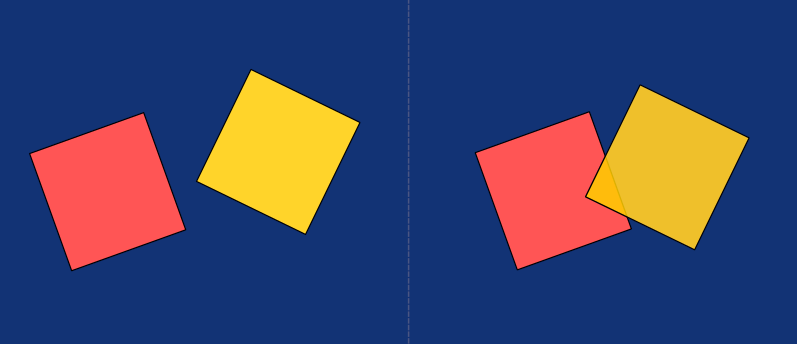
The SAT splits the problem into a few smaller steps. First, we need to find the normals of every edge (in 3D, we're looking for the normals of every face).
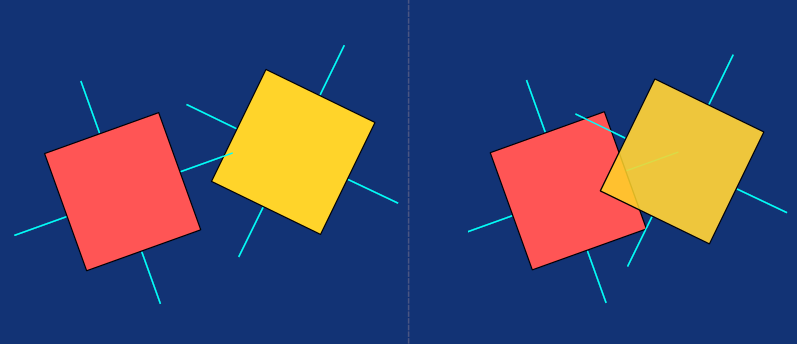
These normals form a set of axes, as you can see in the following image.
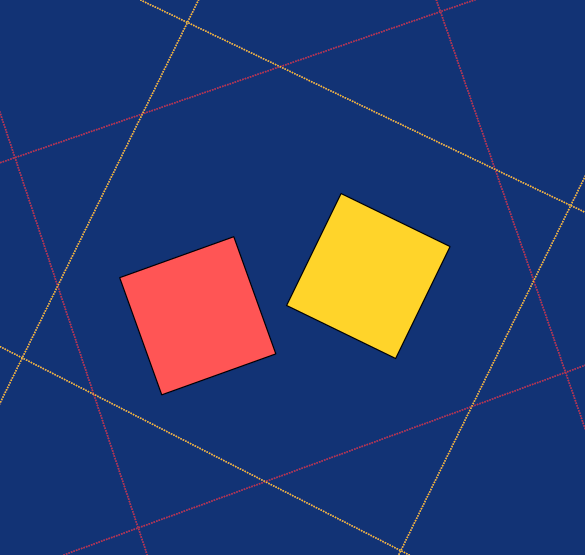
The SAT is named like that because it's about looking for a separating axis. In the next step, we pick one axis and project both shapes onto this axis. If you went through the Software Renderer in Odin from Scratch series, or at least the recommended parts, you already know that projection reduces a projected object or shape to an N-1 dimensional object or shape where N is the number of dimensions in space from which we project it.
A 3D object is projected as a 2D shape on a screen, or it casts a shadow, which is also a two-dimensional shape. A 2D shape is projected into a line, and a line is a 1D shape. This works in higher dimensions too; you can project a 4D object, such as a hypercube, into 3D space. Anyway, in our 2D example, we conceptually project both shapes onto one of the axes made by a normal.
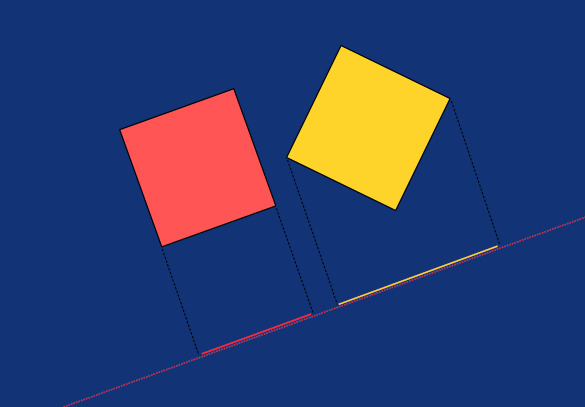
If there's a gap between these two lines, in other words, if they don't overlap, then we can be sure these shapes don't intersect each other, and if that's true for at least one axis, we don't have to look further; we found a separation axis, thus the shapes don't collide.
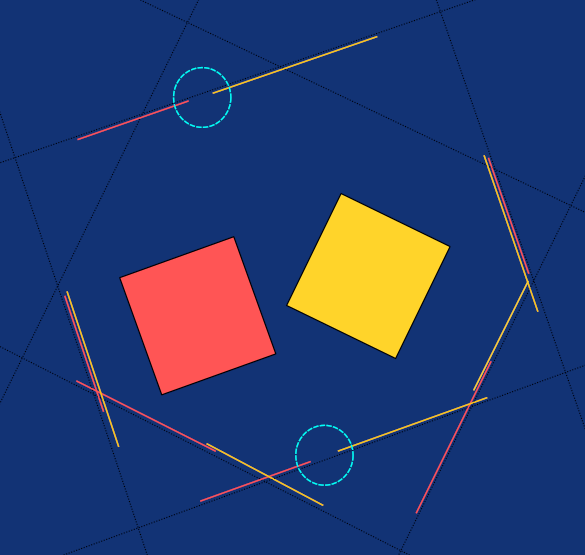
We were lucky. The first axis we chose is the one where the projections don't overlap. However, if we'd chosen a different one, we might get an overlap, in which case we'd have to look further. In the following image, you can see these two shapes projected on all potential separation axes.
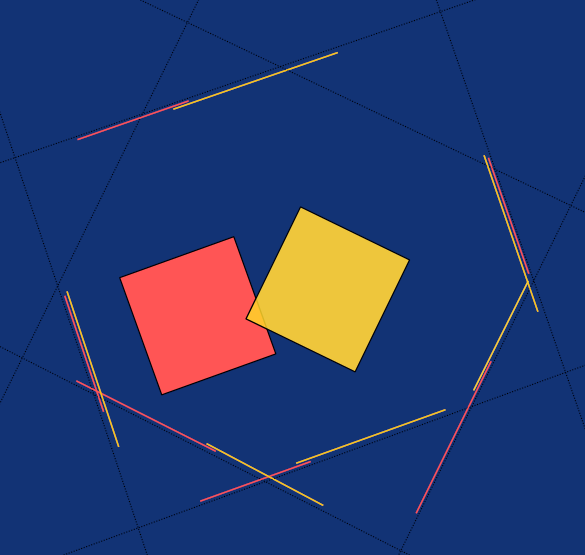
Now look at the following picture, where shapes do collide, and you won't be able to find any axis where projected lines don't overlap.
And that's SAT in a nutshell. So far we talked only about collision detection; for collision resolution we also need to calculate penetration depth and direction. I'll explain that in more depth, as we'll be implementing both collision detection and resolution.
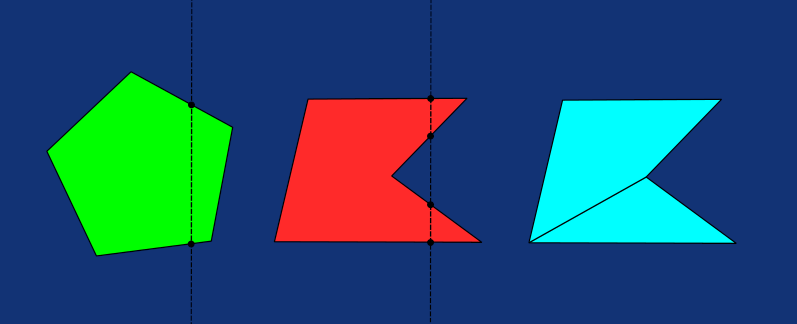
One last thing before we delve into implementation. We'll implement the SAT algorithm specifically for Oriented Bounding Boxes (OBBs), but I'll refer to it from now on just as SAT. Just keep in mind that general SAT works for arbitrary convex polygons (or polyhedra in 3D). A convex shape is one where any line segment connecting two points inside the shape lies entirely inside the shape. Intuitively, a line passing through a convex shape enters and exits it only once. The problem has a simple solution. We can split the non-convex shape into more convex shapes and resolve collisions with SAT separately.
Now that we have a rough idea about what SAT is, let's explain the theorem in more depth in 3D (pun intended) while implementing it. Let's add a new file into your project and name it collisions.odin.
After the usual package definition, we need two structs, one for a collider, which is usually represented by a simpler geometric shape. The reason for this is optimization, and since we're initially working only with box-shaped colliders, we don't even need a new struct; aVector3 type alias will do.
package main

BoxCollider :: Vector3
Collision resolution is computationally expensive in general. Let's consider a typical coffee mug in a game. It's a hollow cylinder open on top, closed at the bottom, and with a handle. Using the render mesh as the collider for such an object would be precise, as you'd be able to put a smaller object inside, or even put something through its handle; however, it really wouldn't add any value for the gameplay that is justifiable for the computational cost of resolving collisions for such an object. And another problem is that such a mug is a concave object.
To make the environment rich and immersive with nice visual storytelling, you usually want a lot of objects, and simulating precise collisions for all of them would bring a tremendous computational burden for the entire simulation. Thus, game engines typically use simplified shapes for colliders: boxes, spheres, capsules, cylinders, and cones, or mesh colliders that have significantly fewer triangles than the triangles for visual representations of these objects. Concave objects often have a set of colliders, sometimes called together as a compound collider, made of the simplest 3D shapes listed in the previous sentence.
Now, let's add a struct for representing a collision result. We're going to return an instance of this struct from the ResolveCollisions procedure, which we're going to implement soon.
CollisionResult :: struct {
    hit: bool,
    normal: Vector3,
    depth: f32
}
Let's first implement the GetCollisionResult procedure. The procedure takes references to two models and returns a CollisionResult.
GetCollisionResult :: proc(a, b: ^Model) -> CollisionResult {
Inside the body of this procedure, we use the GetAxesFromRotationMatrix we've previously implemented in matrix.odin to get the first 6 axes we need for the SAT. Then we create an array of 15 Vector3's and populate the first six elements with these axes.
axesA := GetAxesFromRotationMatrix(a.rotationMatrix)
axesB := GetAxesFromRotationMatrix(b.rotationMatrix)

axes: [15]Vector3
axes[0] = axesA[0]
axes[1] = axesA[1]
axes[2] = axesA[2]
axes[3] = axesB[0]
axes[4] = axesB[1]
axes[5] = axesB[2]
For two box colliders, SAT requires testing 15 candidate separating axes. The 3 face normals from each box (6 in total) and the 9 axes formed by the cross products of every pair of these axes. These additional axes are necessary to detect edge-edge separations. Let's use our Vector3CrossProduct procedure and store the results as elements of axes from index 6 to 15.
idx := 6
for i in 0..<3 {
    for j in 0..<3 {
        axes[idx] = Vector3CrossProduct(axesA[i], axesB[j])
        idx += 1
    }
}
Now we have all 15 axes to which we project radii of both objects using the ProjectRadius procedure, which we'll write at the end of the GetCollisionResult. Apart from that, we need a direction between those two objects. That we get simply by subtracting their positions. We also need minDepth and minNormal. We set the minDepth to the maximum value of the f32 type at the beginning, and then we get the value we need within a loop over all axes.
direction := b.translation - a.translation

minDepth: f32 = max(f32)
minNormal: Vector3
We need these values for our CollisionResult. It's not enough for collision resolution to know just if a collision occurred. To resolve collisions by pushing these objects away from each other, we need to know how much they overlap, and most importantly, in which directions to push them.
If there is overlap on all axes, then the two objects collide and the minNormal is the normalized axis with the minimum overlap. The projection is the absolute value of the dot product between the direction and normalizedAxis, while the overlap is the sum of projected radii minus the projection.
for axis in axes {
    if Vector3Length(axis) < 1e-6 do continue

    normalizedAxis := Vector3Normalize(axis)

    radiusA := ProjectRadius(a.collider * a.scale, axesA, normalizedAxis)
    radiusB := ProjectRadius(b.collider * b.scale, axesB, normalizedAxis)

    projection := abs(Vector3DotProduct(direction, normalizedAxis))
    overlap    := radiusA + radiusB - projection

    if overlap <= 0 do return CollisionResult{hit = false}

    if overlap < minDepth {
        minDepth  = overlap
        minNormal = normalizedAxis
    }
}
Notice we also added a guard to skip very small axes; this solves the issue of parallel axes producing near-zero cross products. As you can see, once we find there's a single non-overlapping axis, we early return from the GetCollisionResult procedure with a CollisionResult where hit is set to false, indicating no collision. This loop is the heart of SAT, since this is the exact place we're looking for a separation axis.
Also notice that we pass our collider scaled by the scale of the model. We have boxes of different sizes, and we can scale them with the plus and minus keys on the keypad, so this is necessary to always get the collider that matches the size of the visual model. Without scaling in runtime, this, of course, could be precalculated once when adding a collider to the model.
In case the objects collide, we get past the loop, and we now use the correctminDepth and minNormal when returning a CollisionResult with hit set to true. However, there's a small caveat: if the dot product between the direction and minNormal is smaller than 0, we have to flip the minNormal; otherwise, with the collisions from the "negative" side in our world space, we'd then push the objects in the opposite direction, inside instead of outside the model. That's the exact opposite of the collision resolution we want.
return CollisionResult{
    hit = true,
    normal = -minNormal if Vector3DotProduct(direction, minNormal) < 0 else minNormal,
    depth = minDepth
}
Let's implement the ProjectRadius procedure. It's used only within the scope of GetCollisionResult, so we can write it as its inner procedure. It takes a collider, 3 axes, and the normalized axis. The result is a sum of the x, y, and z components of the collider scaled by the dot product of the respective axis with the normalized axis.
ProjectRadius :: proc(collider: BoxCollider, axes: [3]Vector3, axis: Vector3) -> f32 {
return collider.x * abs(Vector3DotProduct(axes[0], axis)) +
collider.y * abs(Vector3DotProduct(axes[1], axis)) +
collider.z * abs(Vector3DotProduct(axes[2], axis))
}
}
Now that we have the collision detection implemented, let's implement the other procedure with a nested loop over all pairs of models in our scene where we use the GetCollisionResult and eventually, for those pairs that the GetCollisionResult procedure returns a result with hit set to true, resolve the collision by correcting their positions and adjusting their velocity.
The ResolveCollisions procedure accepts a collection of models and does with each pair what is described in the previous paragraph. It skips both collision detection and resolution for models that are both static or if any of them has a collider of effectively zero volume.
ResolveCollisions :: proc(models: []Model) {
    for i in 0..<len(models) {
        for j in i + 1..<len(models) {
            a := &models[i]
            b := &models[j]

            if a.rigidBody.isStatic && b.rigidBody.isStatic do continue

            if (a.collider.x * a.collider.y * a.collider.z < 1e-6 ||
                b.collider.x * b.collider.y * b.collider.z < 1e-6) { continue }

            result := GetCollisionResult(a, b)

            if result.hit {
                Correct(a, b, result)
                Push(a, result.normal)
            }
        }
    }
The Correct and Push procedures are only called in the scope of the ResolveCollisions, so we can make them both inner procedures as well. Let's start with the Correct, which accepts references to both models and a CollisionResult.
Correct :: proc(a, b: ^Model, result: CollisionResult) {
    correction := result.normal * max(result.depth, 0.0)

    if !a.rigidBody.isStatic && !b.rigidBody.isStatic {
        a.translation -= correction * 0.5
        b.translation += correction * 0.5
    } else if !a.rigidBody.isStatic {
        a.translation -= correction
    } else if !b.rigidBody.isStatic {
        b.translation += correction
    }
}
As you can see, the amount we correct the position when both models are non-static is half of the penetration depth along the penetration normal in the opposite directions, but we never want to go negative. When one of the models is static, we apply the entire correction to the non-static one. This resolves the penetration in the common case.
They can still intersect when there are a lot of them stacked on each other. Or they can pass through when they move so fast that their positions are checked in one frame and they don't collide, but in the next frame they already moved past their colliders, so the collision detection never had a chance to detect the collision. You can see both cases in many games.
Let's now implement the Push procedure. This one is even simpler; it accepts a reference to a single model and a collision normal, and if the model is not static, it subtracts from its velocity the collision normal scaled by the dot product between its current velocity and that collision normal.
Push :: proc(model: ^Model, normal: Vector3) {
    if model.rigidBody.isStatic do return

    model.rigidBody.velocity -= Vector3DotProduct(model.rigidBody.velocity, normal) * normal
}
We're going to call the ResolveCollisions procedure every frame, and you probably already know that checking collisions between all models is sub-optimal. We'll tackle this problem later in this series with octrees.
Now, let's switch over to the model.odin file and add a new member named collider of type BoxCollider in the Model struct definition.
Model :: struct {
    mesh: Mesh,
    texture: Texture,
    color: rl.Color,
    wireColor: rl.Color,
    translation: Vector3,
    rotationMatrix: Matrix4x4,
    scale: f32,
    rigidBody: RigidBody,
    collider: BoxCollider
}
Later, we'll also have a SphereCollider and a union of a BoxCollider and a SphereCollider named Collider, which we use here instead. That's why we named this member rather than just collider and not boxCollider. Let's also add a procedure for "adding" a box collider to the model. Remember, we treat a collider of near-zero volume as effectively no collider, and Vector3 with X, Y, and Z components of 0 is automatically the initial value of collider in a Model struct.
AddBoxCollider :: proc(model: ^Model, size: Vector3 = { 1.0, 1.0, 1.0 }) {
    model.collider = size
}
Now we have everything we need for both collision detection and resolution. Let's go to main.odin and use the AddBoxCollider to add colliders to all of our cubes by adding the following three lines of code right after the LoadModel calls.
AddBoxCollider(&cubeM)
AddBoxCollider(&cubeL)
AddBoxCollider(&cubeFloor)
Finally, after we call ApplyPhysics in our fixed-time physics loop, let's call the ResolveCollisions procedure passing in the collection of our models.
physicsAccumulator += deltaTime
for physicsAccumulator >= PHYSICS_TIMESTEP {
    ApplyPhysics(models, PHYSICS_TIMESTEP)
    ResolveCollisions(models)
    physicsAccumulator -= PHYSICS_TIMESTEP
}
And that's it for today. If you now compile and run our simulation (odin run . -o:speed), two smaller boxes should fall, and then all three should rest on top of each other, since the bottom one is static and serves as a floor.
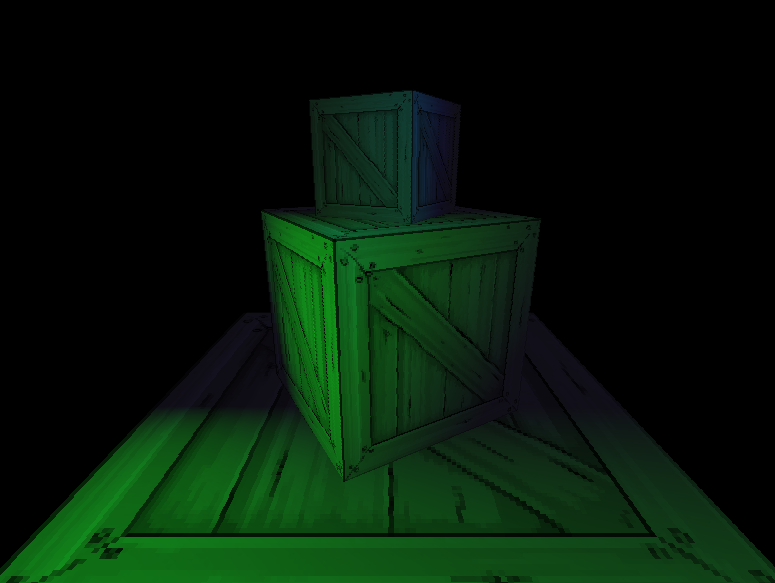
If something doesn't work as expected, you can always refer to the complete implementation for this part in this GitHub repository. In the next part, we're going to implement raycasting so we can select and push or pull those non-static boxes around using the mouse.
Enjoyed this article? Support my work ❤️
All content on this blog, which I've already put hundreds of hours into, is and always will be free.
No ads. No paywalls. No tricks.
I've personally paid for a lot of educational content, but I strongly believe knowledge should be accessible to everyone.
I also pay to keep this blog up and running, and if you like what I do here, if it has helped you, and you would like to support me, you can
Even a small contribution, the price of a coffee, is very much appreciated.