Software Renderer in Odin from Scratch, Part XII
1st February 2026 • 17 min read
In the previous part, we've optimized our software renderer that is already capable of rendering a mesh in eight different modes. Today, we're going to implement switching between orthographic and perspective projection, the one we currently use, at runtime. This effectively extends our renderer from eight to sixteen rendering options, since we'd be able to switch between those two projections in any of the previously implemented rendering modes.
We've already talked about perspective projection in Part III, and we know that the type of projection depends mainly on the projection matrix. We've implemented a factory procedure for making one in the matrix.odin file, the MakeProjectionMatrix procedure.
In this part, we're going to rename MakeProjectionMatrix to MakePerspectiveMatrix and add another one, the MakeOrthographicMatrix. Then, we extend our main logic and input handling to be able to switch between two projection matrices produced by these factory procedures, and finally, we pass the selected matrix into our rendering pipeline. Thus, we'll have to slightly extend some procedures in the draw.odin file.
But before that, let's briefly refresh what we know about the perspective projection and how it differs from the orthographic one. The perspective projection is the most natural for us. Its main characteristic is that objects further from a viewer appear smaller due to the fact that parallel lines converge as they move away from the viewer. This is not the case for the orthographic projection; the parallel lines are preserved and never converge.
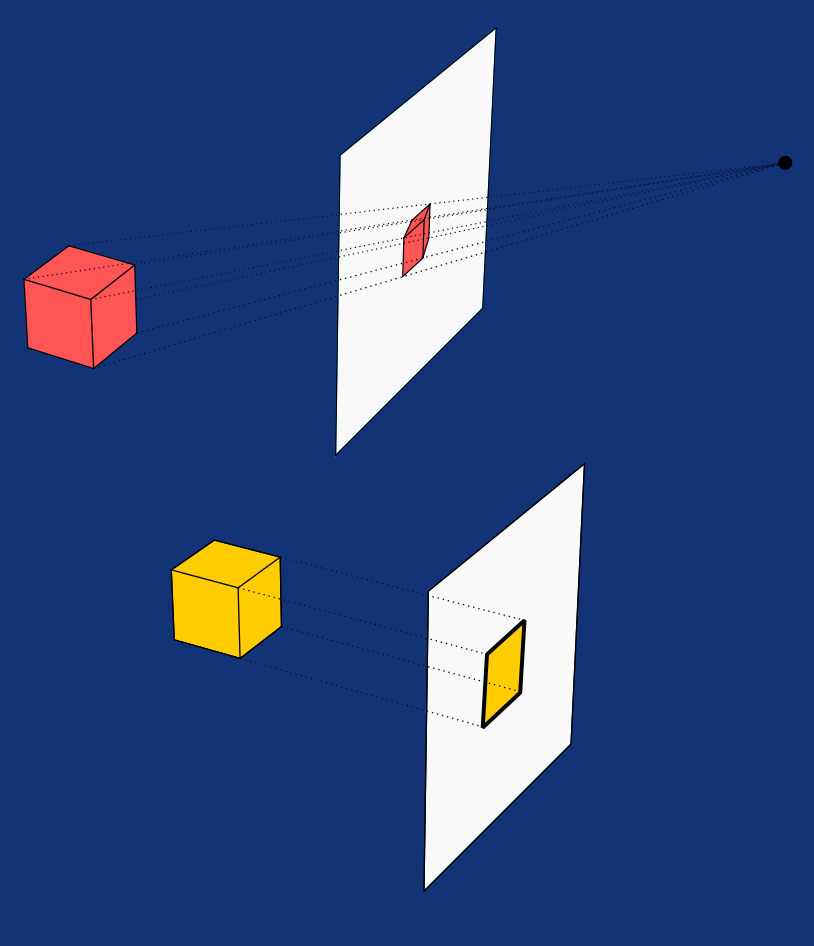
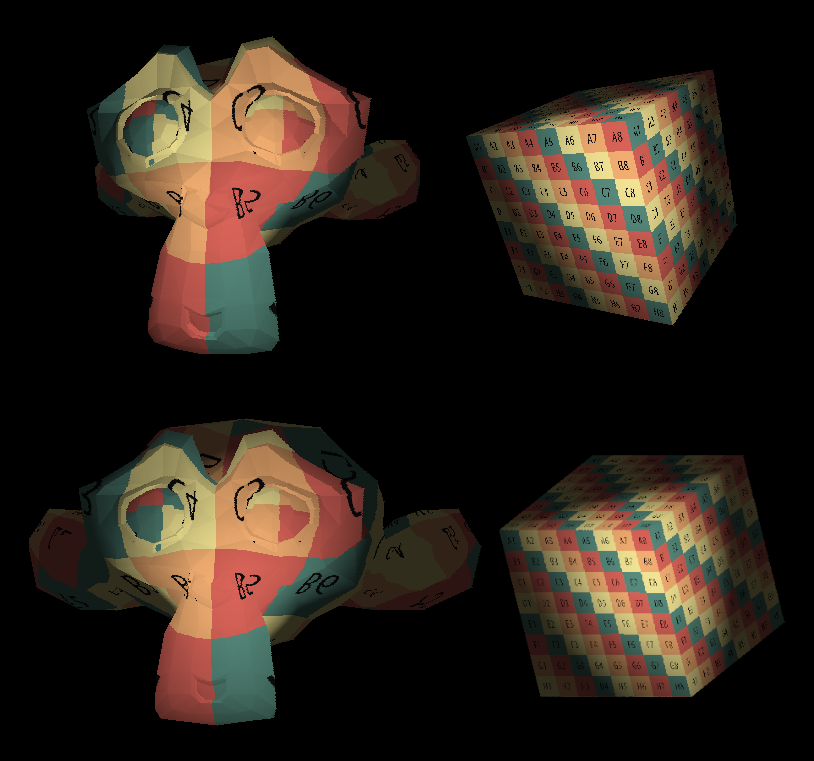
Once we extend our renderer, you'll see that with orthographic projection selected, if you move the mesh further from the camera with the W key or closer with the S key, its size on the screen won't change. Though it might disappear once you move it behind the far plane or in front of the near plane due to frustum culling, since the mesh still moves in space, and in Phong shading modes, how the surface is lit is also affected by the relative position to the light source. The fact that it appears as if it doesn't move forward or backward is only due to the lack of perspective.
The orthographic projection is often used in CAD systems and in some RPG and strategy games. If you play those, especially the classic ones, you've must have heard about the isometric view. The isometric projection is a special case of axonometric projection, which itself belongs to the group of orthographic projections. The orthographic projection belongs to the group of parallel projections, while parallel projections and perspective projections are part of the linear projections group. There are more projections, both in and out of this family, such as those in the curvilinear group. We're not going to cover these in this tutorial, but I do recommend you do some research on this topic.
The orthographic matrix has the same size as the perspective one. It's a common 4 by 4 matrix, and I find it quite elegant that we can switch between different projections effectively just by swapping one matrix for another. When constructing an orthographic matrix, we don't need a field of view (FOV) angle, which is relevant only for line convergence in perspective projection. But we do need an aspect ratio, which we calculate by dividing the width of our screen by its height. That's actually all we need to set the left, right, bottom, and top values for the following matrix, as the right is simply the aspect, left is the negative (in other words, aspect * -1), and top and bottom are always 1.0 and -1.0, respectively. Apart from that, we need far and near values, just as we needed them for the perspective projection matrix.
That being said, open the matrix.odin file, rename the MakeProjectionMatrixprocedure to MakePerspectiveMatrix, and add a new one called MakeOrthographicMatrix:
MakeOrthographicMatrix :: proc(screenWidth: i32, screenHeight: i32, near: f32, far: f32) -> Matrix4x4 {
    aspect := f32(screenWidth) / f32(screenHeight)
    left := -aspect
    right := +aspect
    bottom :: -1.0
    top :: +1.0

    return Matrix4x4{
        {2.0 / (right - left),                  0.0,                  0.0,   -(right + left) / (right - left)},
        {                 0.0, 2.0 / (top - bottom),                  0.0,   -(top + bottom) / (top - bottom)},
        {                 0.0,                  0.0,  -2.0 / (far - near),       -(far + near) / (far - near)},
        {                 0.0,                  0.0,                  0.0,                                1.0},
    }
}
And that was actually all the necessary changes in the matrix.odin file. By renaming the MakeProjectionMatrix procedure, we broke the implementation in the main.odin file. Let's switch over to this file. First, at the top, before the main procedure, define this enum:
ProjectionType :: enum {
    Perspective,
    Orthographic,
}
Then replace the line where we call now non-existent MakeProjectionMatrix and assign its return value to projectionMatrix with these four lines:
projectionMatrix : Matrix4x4
projectionType : ProjectionType = .Perspective
perspectiveMatrix := MakePerspectiveMatrix(FOV, SCREEN_WIDTH, SCREEN_HEIGHT, NEAR_PLANE, FAR_PLANE)
orthographicMatrix := MakeOrthographicMatrix(SCREEN_WIDTH, SCREEN_HEIGHT, NEAR_PLANE, FAR_PLANE)
As you can see, our default projection will still be the perspective, but we prepare and cache both of them, so we can later switch between them using the 1 and 0 keys on the numpad. To implement that, let's hop over to inputs.odin and add a parameter projType of type ^ProjectionType to the HandleInputs procedure. Then, at the end of the procedure, assign it the value of .Perspective if 0 is pressed on the numpad or .Orthographic if 1.
HandleInputs :: proc(
    translation, rotation: ^Vector3,
    scale: ^f32,
    renderMode: ^i8,
    renderModesCount: i8,
    projType: ^ProjectionType,
    deltaTime: f32
) {
    // Here's the rest of the procedure that remains unchanged.

    if rl.IsKeyPressed(rl.KeyboardKey.KP_0) {
        projType^ = .Perspective
    }
    if rl.IsKeyPressed(rl.KeyboardKey.KP_1) {
        projType^ = .Orthographic
    }
}
If you have one of those small modern keyboards without a numpad (my deepest heartfelt condolences), just choose different keys. Now, back in main.odin, pass the reference to projectionType into the HandleInputs procedure, and after that, write a switch block to assign to projectionMatrix either perspectiveMatrix or orthographicMatrix according to the value of projectionType.
HandleInputs(&translation, &rotation, &scale, &renderMode, renderModesCount, &projectionType, deltaTime)

switch projectionType {
    case .Perspective: projectionMatrix = perspectiveMatrix
    case .Orthographic: projectionMatrix = orthographicMatrix
}
Let's now proceed with changes in draw.odin. First, extend the signature of the ProjectToScreen procedure with a new parameter projType of type ProjectionType and change the return statement into a switch over the projType:
ProjectToScreen :: proc(projType: ProjectionType, mat: Matrix4x4, p: Vector3) -> Vector3 {
    // Here's the rest of the procedure that remains unchanged.

    switch projType {
        case .Perspective: return Vector3{screenX, screenY, invW}
        case .Orthographic: return Vector3{screenX, screenY, -clip.z}
    }

    // The program never reaches this point, but we need to keep it
    // to avoid a compilation error due to a missing return statement.
    return Vector3{}
}
As you can see, in case we use the orthographic projection matrix, we're storing per projected vertex, not the inverse of the fourth component from clip space, to which we transformed the vertices using the projection matrix, but rather the negative of the third component, the clip.z * -1, or simply -clip.z, because with orthographic projection, the clip.w is constant and clip.z alone for storing depth is enough.
Before fixing the calls that have been broken by this change, let's also change the IsBackFace procedure. Once again, we're going to add a new parameter projType of type ProjectionType, but this time we switch over projType to set the toCamera vector, which should be a backward-facing unit vector in the case of orthographic projection.
IsBackFace :: proc(projType: ProjectionType, v1, v2, v3: Vector3) -> bool {
    // Here's the rest of the procedure that remains unchanged.

    toCamera: Vector3
    switch projType {
        case .Perspective: toCamera = Vector3Normalize(v1)
        case .Orthographic: toCamera = Vector3{0, 0, -1}
    }

    // Here's the rest of the procedure that remains unchanged.
}
Now, let's fix all the broken procedure calls. The first is in the DrawWireframe procedure, to which we also need to add a new parameter projType so we can pass it on to ProjectToScreen and IsBackFace procedures:
DrawWireframe :: proc(
    vertices: []Vector3,
    triangles: []Triangle,
    projMat: Matrix4x4,
    projType: ProjectionType,
    color: rl.Color,
    cullBackFace: bool,
    image: ^rl.Image
) {
    // Here's the rest of the procedure that remains unchanged.
    if cullBackFace && IsBackFace(projType, v1, v2, v3) {
        continue
    }

    p1 := ProjectToScreen(projType, projMat, v1)
    p2 := ProjectToScreen(projType, projMat, v2)
    p3 := ProjectToScreen(projType, projMat, v3)

    // Here's the rest of the procedure that remains unchanged.
}
In the DrawUnlit procedure, we need to make similar changes:
DrawUnlit :: proc(
    vertices: []Vector3,
    triangles: []Triangle,
    projMat: Matrix4x4,
    projType: ProjectionType,
    color: rl.Color,
    zBuffer: ^ZBuffer,
    image: ^rl.Image
) {
    // Here's the rest of the procedure that remains unchanged.
   if IsBackFace(projType, v1, v2, v3) {
        continue
    }

    p1 := ProjectToScreen(projType, projMat, v1)
    p2 := ProjectToScreen(projType, projMat, v2)
    p3 := ProjectToScreen(projType, projMat, v3)

    // Here's the rest of the procedure that remains unchanged.
}
There are a few more changes needed in the DrawFlatShaded procedure, since we're using the normalized cross product both for calculating backface culling and light intensity here. We implemented that in place instead of calling the IsBackFace procedure, thus we need to make the same changes here as well:
DrawFlatShaded :: proc(
    vertices: []Vector3,
    triangles: []Triangle,
    projMat: Matrix4x4,
    projType: ProjectionType,
    light: Light,
    color: rl.Color,
    zBuffer: ^ZBuffer,
    image: ^rl.Image,
    ambient:f32 = 0.2
) {
    // Here's the rest of the procedure that remains unchanged.

    toCamera: Vector3
    switch projType {
        case .Perspective: toCamera = Vector3Normalize(v1)
        case .Orthographic: toCamera = Vector3{0, 0, -1}
    }

    if Vector3DotProduct(crossNorm, toCamera) >= 0.0 {
        continue
    }

    p1 := ProjectToScreen(projType, projMat, v1)
    p2 := ProjectToScreen(projType, projMat, v2)
    p3 := ProjectToScreen(projType, projMat, v3)

    // Here's the rest of the procedure that remains unchanged.
}
The same applies to the DrawTexturedFlatShaded procedure:
DrawFlatShaded :: proc(
    vertices: []Vector3,
    triangles: []Triangle,
    projMat: Matrix4x4,
    projType: ProjectionType,
    light: Light,
    color: rl.Color,
    zBuffer: ^ZBuffer,
    image: ^rl.Image,
    ambient:f32 = 0.2
) {
    // Here's the rest of the procedure that remains unchanged.

    toCamera: Vector3
    switch projType {
        case .Perspective: toCamera = Vector3Normalize(v1)
        case .Orthographic: toCamera = Vector3{0, 0, -1}
    }

    if Vector3DotProduct(crossNorm, toCamera) >= 0.0 {
        continue
    }

    p1 := ProjectToScreen(projType, projMat, v1)
    p2 := ProjectToScreen(projType, projMat, v2)
    p3 := ProjectToScreen(projType, projMat, v3)

    // Here's the rest of the procedure that remains unchanged.
}
In the DrawTexturedUnlit, DrawPhongShaded, and DrawTexturedPhongShaded procedures, the changes are just as straightforward as before. We're just adding the new projType parameter and passing it on:
DrawTexturedUnlit :: proc(
    vertices: []Vector3,
    triangles: []Triangle,
    uvs: []Vector2,
    texture: Texture,
    zBuffer: ^ZBuffer,
    projMat: Matrix4x4,
    projType: ProjectionType,
    image: ^rl.Image
) {
    // Here's the rest of the procedure that remains unchanged

    if IsBackFace(projType, v1, v2, v3) {
        continue
    }

    p1 := ProjectToScreen(projType, projMat, v1)
    p2 := ProjectToScreen(projType, projMat, v2)
    p3 := ProjectToScreen(projType, projMat, v3)

    // Here's the rest of the procedure that remains unchanged
}
DrawPhongShaded :: proc(
    vertices: []Vector3,
    triangles: []Triangle,
    normals: []Vector3,
    light: Light,
    color: rl.Color,
    zBuffer: ^ZBuffer,
    projMat: Matrix4x4,
    projType: ProjectionType,
    image: ^rl.Image,
    ambient: f32 = 0.1
) {
    // Here's the rest of the procedure that remains unchanged

    if IsBackFace(projType, v1, v2, v3) {
        continue
    }

    p1 := ProjectToScreen(projType, projMat, v1)
    p2 := ProjectToScreen(projType, projMat, v2)
    p3 := ProjectToScreen(projType, projMat, v3)

    // Here's the rest of the procedure that remains unchanged
}
DrawTexturedPhongShaded :: proc(
    vertices: []Vector3,
    triangles: []Triangle,
    uvs: []Vector2,
    normals: []Vector3,
    light: Light,
    texture: Texture,
    zBuffer: ^ZBuffer,
    projMat: Matrix4x4,
    projType: ProjectionType,
    image: ^rl.Image,
    ambient: f32 = 0.2
) {
    // Here's the rest of the procedure that remains unchanged

    if IsBackFace(projType, v1, v2, v3) {
        continue
    }

    p1 := ProjectToScreen(projType, projMat, v1)
    p2 := ProjectToScreen(projType, projMat, v2)
    p3 := ProjectToScreen(projType, projMat, v3)

    // Here's the rest of the procedure that remains unchanged
}
That's all in the draw.odin. Finally, back in the main.odin file, in our main loop, we just need to pass the projectionType to all rendering pipelines we just updated:
switch renderMode {
        case 0: DrawWireframe(mesh.transformedVertices, mesh.triangles, projectionMatrix, projectionType, rl.GREEN, false, &renderImage)
        case 1: DrawWireframe(mesh.transformedVertices, mesh.triangles, projectionMatrix, projectionType, rl.GREEN, true, &renderImage)
        case 2: DrawUnlit(mesh.transformedVertices, mesh.triangles, projectionMatrix, projectionType, rl.WHITE, zBuffer, &renderImage)
        case 3: DrawFlatShaded(mesh.transformedVertices, mesh.triangles, projectionMatrix, projectionType, light, rl.WHITE, zBuffer, &renderImage)
        case 4: DrawPhongShaded(mesh.transformedVertices, mesh.triangles, mesh.transformedNormals, light, rl.WHITE, zBuffer, projectionMatrix, projectionType, &renderImage)
        case 5: DrawTexturedUnlit(mesh.transformedVertices, mesh.triangles, mesh.uvs, texture, zBuffer, projectionMatrix, projectionType, &renderImage)
        case 6: DrawTexturedFlatShaded(mesh.transformedVertices, mesh.triangles, mesh.uvs, light, texture, zBuffer, projectionMatrix, projectionType, &renderImage)
        case 7: DrawTexturedPhongShaded(mesh.transformedVertices, mesh.triangles, mesh.uvs, mesh.transformedNormals, light, texture, zBuffer, projectionMatrix, projectionType, &renderImage)
    }
Conclusion
And that's all for today. As you saw, switching between perspective and orthographic projection is, apart from a few minor details, just about swapping between different projection matrices. If you now compile and run our renderer (odin run . -o:speed), you should be able to switch between these two projections in any rendering mode using the 1 and 0 keys on the numpad, or whatever keys you have set in the HandleInputs procedure.
If something doesn't work as expected, you can always compare your version with the implementation for this part in this GitHub repository. In the next part, we're going to implement support for multiple lights with different colors, which means we're also going to talk about color mixing.
Enjoyed this article? Support my work ❤️
All content on this blog, which I've already put hundreds of hours into, is and always will be free.
No ads. No paywalls. No tricks.
I've personally paid for a lot of educational content, but I strongly believe knowledge should be accessible to everyone.
I also pay to keep this blog up and running, and if you like what I do here, if it has helped you, and you would like to support me, you can

Even a small contribution, the price of a coffee, is very much appreciated.
Other Parts of This Series
- Software Renderer in Odin from Scratch, Part I
- Software Renderer in Odin from Scratch, Part II
- Software Renderer in Odin from Scratch, Part III
- Software Renderer in Odin from Scratch, Part IV
- Software Renderer in Odin from Scratch, Part V
- Software Renderer in Odin from Scratch, Part VI
- Software Renderer in Odin from Scratch, Part VII
- Software Renderer in Odin from Scratch, Part VIII
- Software Renderer in Odin from Scratch, Part IX
- Software Renderer in Odin from Scratch, Part X
- Software Renderer in Odin from Scratch, Part XI
- Software Renderer in Odin from Scratch, Part XII
- Software Renderer in Odin from Scratch, Part XIII
- Software Renderer in Odin from Scratch, Part XIV